

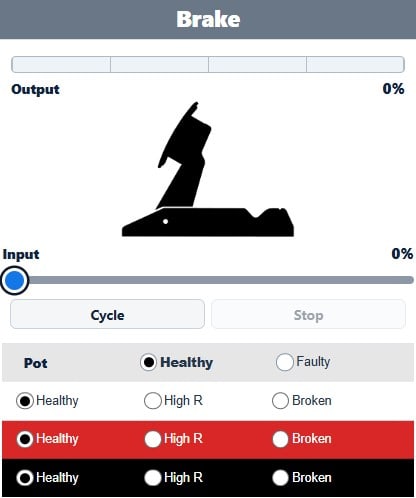
Use this simulator to see how common Logitech G-series pedal faults can affect the pedal output seen by the wheel, PC or console. It can help give you an indication of whether your pedals wiring or potentiometers are damaged or faulty.
Move the Input slider to simulate pressing each pedal. The Output shows the signal the wheel would receive.
You can then introduce faults to the potentiometers and wiring to see how the pedal output changes.
How to use the simulator
Start with everything set to Healthy and move the Clutch, Brake and Accelerator inputs through their full range.
Each pedal can have faults introduced on the potentiometer and its three wires:
- Pot (Potentiometer): Healthy / Faulty (Faults here causes loss of signal when pedal moves and floating signal voltage)
- Green/White/Orange: Healthy / High R / Broken (Faults here cause floating signal voltage)
- Red: Healthy / High R / Broken (Faults here stops output from reaching 0%)
- Black: Healthy / High R / Broken (Faults here cause output to reach 100% before it should)
Fault types:
- Healthy: Simulates a perfectly working wire and connection
- High R (High Resistance): Simulates a poor connection or partially damaged wire with increased electrical resistance.
- Broken: Simulates a completely broken wire.
You can select more than one fault at the same time. This is useful because damage to the stock Logitech wiring loom can sometimes affect more than one pedal.
Wheel to Pedal Cable
The controls at the bottom simulate faults in the main cable between the wheel and the pedal set.
A problem with the red or black wire here can affect all three pedals because these connections supply the complete pedal set.
About the stock Logitech wiring

The simulator represents the electrical behaviour of the standard Logitech pedal wiring loom.
In the stock loom, the red 3.3 V and black 0 V connections are daisy-chained through the pedals in this order:
Clutch → Brake → Accelerator
This means a wiring fault at one point in the loom can sometimes affect another pedal farther along the circuit.
Each pedal also has its own signal wire:
Clutch = Green · Brake = White · Accelerator = Orange
Wiring short circuits
For simplicity, the simulator does not model shorted wires or connectors. Shorts can give the following issues:
- If the red and black wires are shorted together, the Logitech wheel will shutdown and not power up until the short is removed or the pedals disconnected.
- If a red wire and a signal wire are shorted, the output of that signal will go to 0%.
- If a black wire and a signal wire are shorted, the output of that signal will go to 100%.
Important notes
- This is not a full electronic circuit simulation. Real faults can behave differently depending on the amount of resistance, the exact location of the damage, the condition of the potentiometers and how the wheel or software interprets the signal.
- G-HUB and other PC software can make Logitech pedal faults difficult to diagnose because it does not necessarily show the raw electrical signal coming from the pedals. The software can process, scale and calibrate the signal before displaying the pedal output. This can hide or alter the symptoms of a hardware fault, making fault diagnosis very difficult. In this case we recommend connecting your wheel/pedals to a console as it will make things much easier. Alternatively using a multimeter (and some knowledge!) is a very good way to diagnose problems with the pedals.
- The simulator is intended to demonstrate the typical symptoms of common Logitech pedal faults and help you understand what may be happening inside the pedal set.
- If you’re diagnosing an actual fault, use the simulator alongside our Logitech pedal troubleshooting guides and tests.
- The simulator is applicable to all Logitech G-series pedals G25 / G27 / G29 / G920 / G923